
The CRM data cleanup framework I run once a year


Most CRMs aren't full of customer data. They're full of yesterday's wrong guesses. Here's the cleanup framework I use once a year.
I learned this the slow way. When I started building my own CRM source code last year, I spent way too many hours staring at other people's databases. Migrations, audits, "why is this thing so slow," that kind of work. And the same pattern showed up every single time.
It wasn't that the data was old. It was that the data was wrong on arrival and nobody ever went back to fix it.
That's the reframe I want to plant in your head before we get to the framework. So let me dig in.
Your CRM is a graveyard of decisions you made on a Tuesday
Think about the last time you added a custom field. Or a tag. Or a pipeline stage.
You probably did it in the middle of a workday because a client asked something or a campaign needed tracking. You named the field "lead_source_2" because "lead_source" was already taken from the last time you tried this. You created a tag called "hotleads_2024_Q1" because you were running a promotion. You added a pipeline stage called "needs follow-up" because you were tired of leads slipping.
None of those were bad calls. They were correct on that Tuesday.
The problem is, two years later, that Tuesday is still living in your CRM. The promotion ended. The follow-up stage became a dumping ground. The custom field is filled out on 14% of contacts and ignored everywhere else. Your reports break because half your contacts use "lead_source" and half use "lead_source_2."
This isn't data decay. This is decision sediment. It's every quick fix you ever made, stacked on top of every other quick fix, with no archaeologist coming through to label the layers.
And it kills your reporting, your automations, your team's trust in the system, and eventually your time.
So once a year, I block out three hours and play archaeologist. Here's how.
The 4-quadrant model
Before you touch a single record, you need to decide what each piece of data IS to you. Not what it WAS when you created it. What it IS now.
Every field, tag, pipeline stage, and contact in your CRM falls into one of four quadrants:
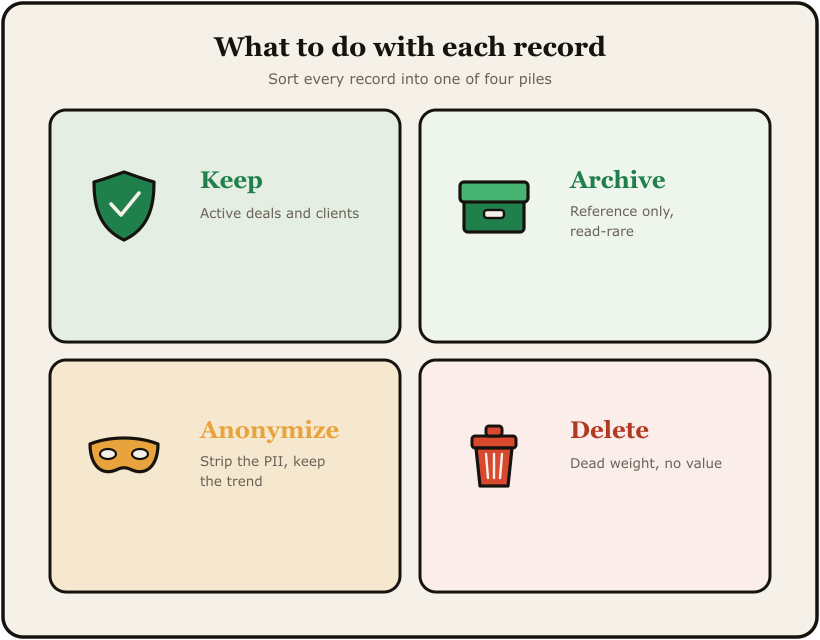
Keep. It's actively used in a current workflow, automation, or report. Touch this and something breaks today. Leave it alone, label it clearly, document it.
Archive. It mattered once and might matter again. Old campaign tags from a seasonal promo that runs every year. Historical pipeline data you need for year-over-year reporting. Move it somewhere it doesn't pollute your day-to-day views but doesn't get lost either. In most CRMs that means a dedicated archive folder, a frozen list, or a snapshot exported to cold storage.
Anonymize. This is the quadrant people forget exists, and it's the most important one for legal reasons. You have a real contact, a real conversation history, real notes, but the person hasn't engaged in years and isn't coming back. If they're in a region with privacy law (GDPR, CCPA, the patchwork of state-level US laws), you may legally need to strip the personally identifiable info but keep the aggregate behavior. Anonymize the name, email, phone. Keep the timestamps and the stage progression for reporting.
Delete. Genuine garbage. Test contacts named "asdf asdf." Duplicates that won't merge cleanly. Bots that filled out your form. Custom fields no automation references. Tags applied to zero contacts. Pipeline stages with zero deals in them for 18 months. Delete it. Stop being precious about data you've never looked at.
The reason this works as a quadrant model and not a checklist is that the same piece of data lives in different quadrants depending on the lens. A custom field called "preferred_contact_method" might be Keep if your team uses it. It might be Archive if you used to use it but switched to a different system. It might be Delete if it was set on three contacts in 2022 and never touched again.
You have to actually look. There's no shortcut.
The 3-hour annual cleanup
I block three hours. One sitting. Coffee, no Slack, door closed. Here's the order.
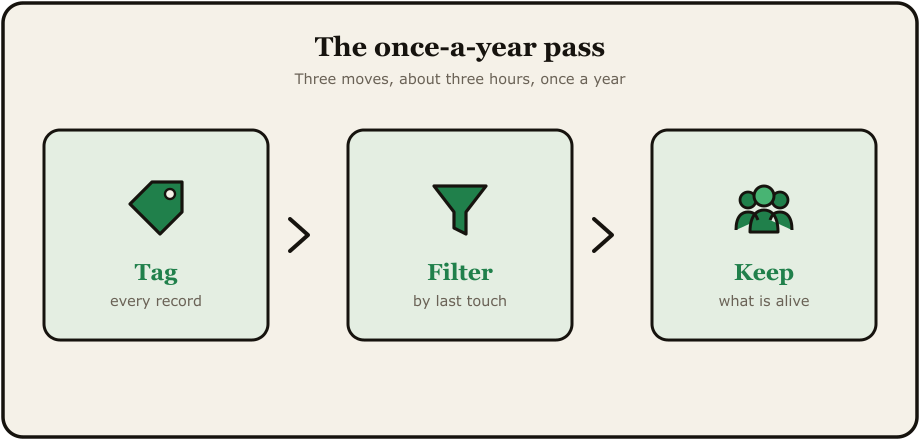
Hour 1: Fields and tags.
Open your list of custom fields. For each one, ask: what's the fill rate? If it's under 20% and no automation references the field, that's a Delete candidate. If it's filled out heavily but you don't actually use it for anything, that's an Archive candidate (you might want the data later, but get it out of your active forms and views).
Same drill for tags. Sort by usage count. Anything with under 10 contacts and no automation, look hard at it. Most of them are dead.
This hour usually nets me about 30% of my total cleanup. Fields and tags are where the sediment piles up fastest because they're the easiest things to create.
Hour 2: Pipelines, stages, and automations.
This one is scarier because real money flows through here. Open each pipeline. Look at each stage. Ask: when was the last deal that sat in this stage? If a stage hasn't seen a deal in 12 months and isn't part of an active workflow, it's clutter. Either delete it or merge it into a stage that does see action.
For automations, look at the last-run-date. Any automation that hasn't fired in 6 months is suspect. Either it's broken (and you didn't notice, which is its own problem) or the trigger condition never happens anymore. Audit it. Fix it or kill it.
I once found an old client account where seven of their twelve automations had been silently broken for over a year. Nobody noticed because nobody was watching the right reports. Those broken automations were the reason their pipeline data was unreliable. We didn't need new automations. We needed to put down the ones that were already dead.
Hour 3: Contacts.
The big one. The one everyone wants to do first and shouldn't.
You do contacts last because by now your fields, tags, and stages are clean, which means your contact filters actually work.
Filter for contacts with no activity in 24 months and no deal history. That's your anonymize-or-delete pile. Filter for contacts with bounced emails and no phone number. Anonymize-or-delete pile. Filter for contacts who unsubscribed and have no open deals. Delete.
You're not trying to be aggressive here. You're trying to be honest. A contact who hasn't opened an email in two years, didn't buy from you, and unsubscribed isn't a "lead." They're a ghost taking up a row in your database and skewing every open-rate number you report.
Total time: three hours, give or take. Once a year.
What this does to your reporting
Here's the part nobody warns you about.
When you clean your CRM properly, your numbers get worse in the short term. Your contact count drops. Your "leads in pipeline" goes down. Your historical reports show different totals than they did last quarter.
This is the right outcome. Your numbers were lying before. They're telling the truth now.
I had a client a while back who was bootstrapping a sister brand off their parent company's existing brand authority. The sister brand had zero online presence of its own, which meant we were going to lean hard on the parent brand's contact list, reporting, and reputation data to make the launch work. Before we touched a thing, we cleaned the parent CRM. The contact list dropped by something like 40%. The owner panicked for about an hour. Then we ran the campaign and the open rates were almost double what they'd been the year before, the click rates were three times higher, and every metric that mattered for actually launching the sister brand was suddenly trustworthy.
Same audience. Just minus the ghosts.
Clean data doesn't make you better at marketing. It just stops your CRM from lying to you about how good or bad you already are. That's worth more than most people realize, because every decision downstream from your reports is only as good as the data feeding them.
I documented one of these cleanups end to end in how I deleted 71% of a CRM's data and my reports stopped lying. Same idea, real numbers.
The thing nobody admits
The reason most people don't clean their CRM is that it forces you to look at the wrong guesses you made. The campaign that flopped. The pipeline stage you invented to make yourself feel like deals were moving. The custom field you swore you'd use and never did.
Cleanup is an ego exercise as much as a data exercise. You're going through a graveyard of your past optimism with a shovel.
Do it anyway. Three hours, once a year. Future you will thank present you.
When did you last clean your CRM? Honest.
A lot of that buildup starts as duplicate and half-finished records. If you are on GoHighLevel, here is a focused walkthrough on cleaning up duplicate and messy contact data and stopping new duplicates at the source.